How we use Filament v4's EmbeddedTable component to keep filter, sort, search and pagination on detail pages — without forcing the user into a separate RelationManager tab.
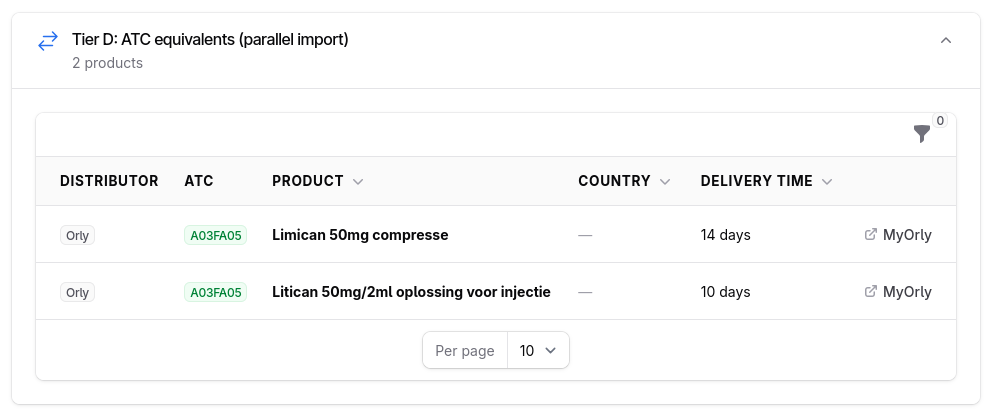
On detail pages in Filament applications, our clients often want to show a lot of related context: a project with its participants, a customer with open invoices, a work order with its linked materials. The default Infolist components are perfect for scalar, static fields — name, date, status — but fall short the moment users want to scan, filter or sort inside a set of related records.
A separate RelationManager tab works, but it breaks the reading flow: the user leaves the main screen and loses the context of the record they were just looking at. We wanted the best of both worlds — a full Filament Table with filters, sorting, search and pagination, embedded right inside the Infolist itself.
The approach: EmbeddedTable inside a Schema section
Filament v4 ships this pattern as a first-class component. Filament\Schemas\Components\EmbeddedTable lets you drop a fully-featured Table directly into a Schema, alongside the regular TextEntry, Section and Tabs components. No custom Livewire wrapper, no glue code — the main record stays in view, the table sits underneath, and every Filament Table convention (column search, multi-select filters, persistent sorting, bulk actions) works out of the box.
The Infolist definition
In the Resource, we define a Section that holds the EmbeddedTable. The table reads the parent record via a relationship name:
use Filament\Schemas\Components\EmbeddedTable;
use Filament\Schemas\Components\Section;
use Filament\Infolists\Infolist;
use Filament\Actions\Action;
use Filament\Tables;
use Filament\Tables\Table;
use Filament\Support\Enums\FontWeight;
use Filament\Support\Icons\Heroicon;

public static function infolist(Infolist $infolist): Infolist
{
    return $infolist->schema([
        Section::make('Tier D: ATC equivalents (parallel import)')
            ->icon(Heroicon::ArrowsRightLeft)
            ->description(fn ($record) => $record->atcEquivalents()->count().' products')
            ->collapsible()
            ->schema([
                EmbeddedTable::make()
                    ->table(fn (Table $table) => $table
                        ->relationship(fn ($record) => $record->atcEquivalents())
                        ->modifyQueryUsing(fn ($q) => $q->with(['distributor', 'country']))
                        ->columns([
                            Tables\Columns\TextColumn::make('distributor.name')
                                ->label('Distributor')
                                ->badge()
                                ->color('gray'),
                            Tables\Columns\TextColumn::make('atc_code')
                                ->label('ATC')
                                ->badge()
                                ->color('success'),
                            Tables\Columns\TextColumn::make('name')
                                ->label('Product')
                                ->weight(FontWeight::Bold)
                                ->searchable()
                                ->sortable(),
                            Tables\Columns\TextColumn::make('country.name')
                                ->label('Country')
                                ->placeholder('—')
                                ->sortable(),
                            Tables\Columns\TextColumn::make('delivery_days')
                                ->label('Delivery time')
                                ->formatStateUsing(fn (int $state) => "{$state} days")
                                ->sortable(),
                        ])
                        ->recordActions([
                            Action::make('portal')
                                ->label(fn ($record) => $record->distributor->portal_label)
                                ->icon(Heroicon::ArrowTopRightOnSquare)
                                ->url(fn ($record) => $record->distributor->portal_url, shouldOpenInNewTab: true)
                                ->link(),
                        ])
                        ->filters([
                            Tables\Filters\SelectFilter::make('distributor')
                                ->relationship('distributor', 'name'),
                        ])
                        ->defaultSort('name')
                        ->paginated([10, 25, 50])
                    ),
            ]),
    ]);
}
That's the whole thing. EmbeddedTable::make() accepts the same table() configuration you already know from RelationManagers and ListPages, so existing column, filter and action definitions can be copy-pasted in. No new mental model.